
AdSense Ready Pro Backup 2026 – Complete Beginner WordPress Setup for Easy AdSense Approval
Original price was: $64.48.$20.94Current price is: $20.94.
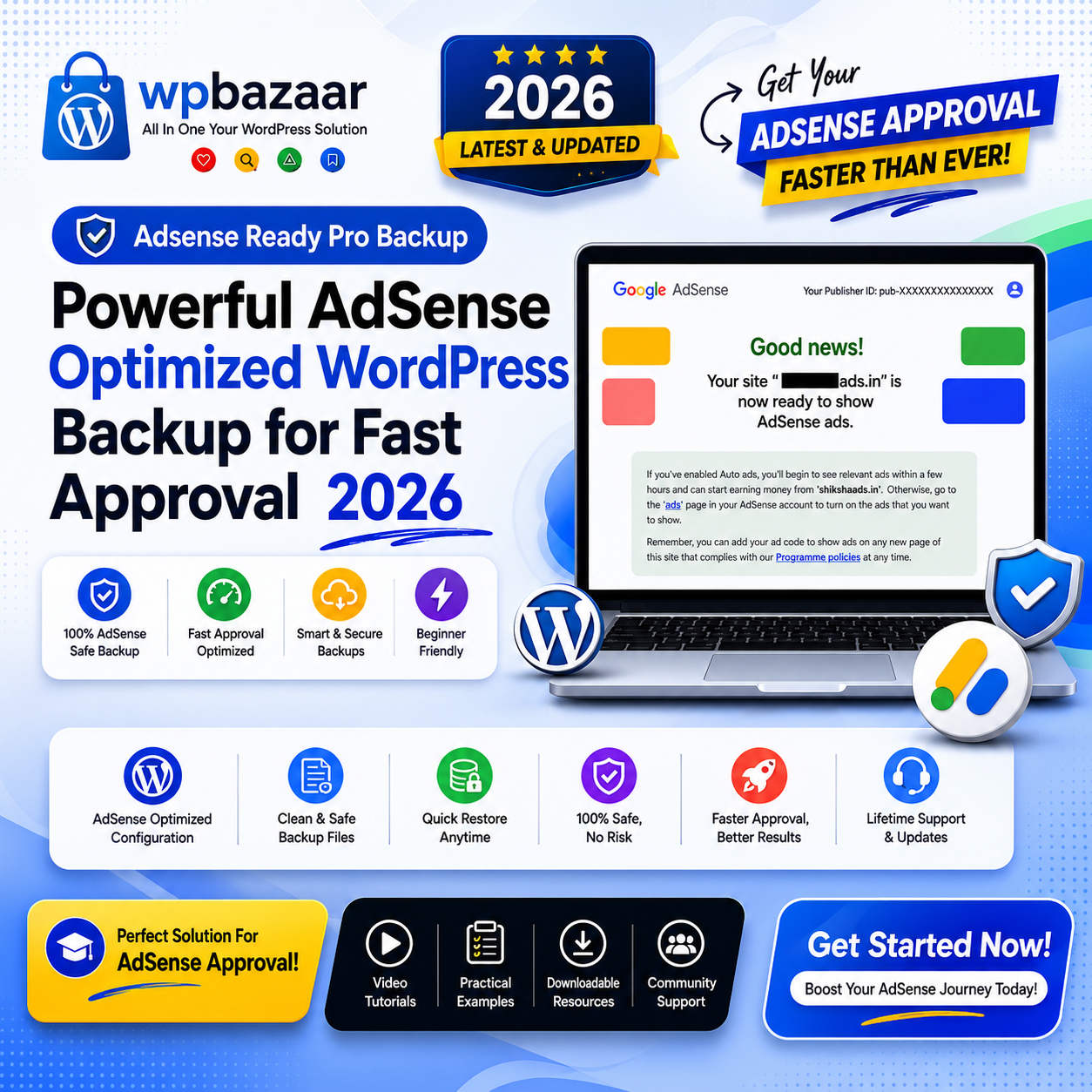
AdSense Ready Pro Backup is a beginner-friendly AdSense optimized WordPress backup that helps users create a professional website quickly with SEO setup, Rank Math configuration, legal pages, and monetization-ready structure.
Monday–Saturday · 10:00 AM–6:00 PM IST · After payment, we verify the transaction first and deliver eligible digital product access during working hours. If you have already paid, please wait for verification—there is no need to pay again or send repeated requests.
Product purchase includes only the files, license and support explicitly shown on the product page. Installation, setup, customization, migration, troubleshooting or other professional services are separate paid services. Contact us on WhatsApp for scope and pricing.
Ask on WhatsApp →Product Details
Description
AdSense Ready Pro Backup 2026 – Starting a new WordPress website and getting Google AdSense approval is not easy for beginners. Most new bloggers install WordPress but do not know what settings to use, which plugins are important, what pages are required, how to setup SEO, how to connect Google Search Console, or when the right time is to apply for AdSense.
Because of poor setup, missing legal pages, weak SEO structure, bad website design, slow speed, or improper content planning, many websites get rejected by AdSense.
That is exactly why AdSense Ready Pro Backup was created.
AdSense Ready Pro Backup is a professionally designed AdSense Optimized WordPress Backup built specially for beginners who want to create an AdSense-friendly website without wasting weeks doing technical setup.
Instead of spending hours setting up themes, plugins, SEO configurations, legal pages, and optimization manually, you simply restore one ready-to-use backup and start publishing your content.
This complete setup is based on real practical experience of AdSense-ready websites and includes the important foundation commonly needed before applying for monetization.
Important Note: We only help you follow a professional and proper setup process based on practical experience. Final AdSense approval, website indexing, ranking, and monetization depend on your content quality, originality, consistency, niche selection, and Google policies. No person or service can guarantee 100% AdSense approval.
✨ What is AdSense Ready Pro Backup?
AdSense Ready Pro Backup is a ready-to-import WordPress website backup specially optimized for beginners who want to create a professional, SEO-friendly, and AdSense-ready website quickly.
It is not just a normal website backup.
This backup is carefully designed to reduce beginner mistakes and help users start with a better website structure from day one.
Many beginners struggle with questions like:
- Which WordPress settings should I change?
- Which plugins are important?
- How should I setup Rank Math SEO?
- Which pages are necessary before AdSense?
- How to connect Search Console?
- How to submit sitemap?
- When should I apply for AdSense?
- How should my blog structure look?
Instead of learning everything separately from YouTube videos or random blogs, this setup gives you a ready professional foundation.
You simply restore the backup, customize branding, upload your content, complete basic Google setup, and start publishing articles.
📦 What is Included Inside AdSense Ready Pro Backup?
This backup package includes almost everything beginners usually need for a professional WordPress website setup.
- ✅ AdSense-friendly WordPress website structure
- ✅ Professional SEO-ready setup
- ✅ Essential plugin configuration
- ✅ Proper website navigation
- ✅ Required legal compliance pages
- ✅ Mobile responsive layout
- ✅ Fast-loading website structure
- ✅ Rank Math SEO configuration
- ✅ Search engine friendly settings
- ✅ Sample SEO article structure
- ✅ Proper homepage layout
- ✅ Category organization system
- ✅ Beginner-friendly dashboard setup
Everything is already arranged professionally so beginners can avoid confusion and unnecessary mistakes.
🔥 Why AdSense Ready Pro Backup is Different?
There are thousands of random WordPress backups available online, but most of them are poorly optimized, overloaded with unnecessary plugins, or built without understanding real AdSense requirements.
AdSense Ready Pro Backup is different because it is based on real website experience and practical AdSense preparation methods.
For more than 3+ years of real website learning and testing, we studied common reasons why websites fail to get approved.
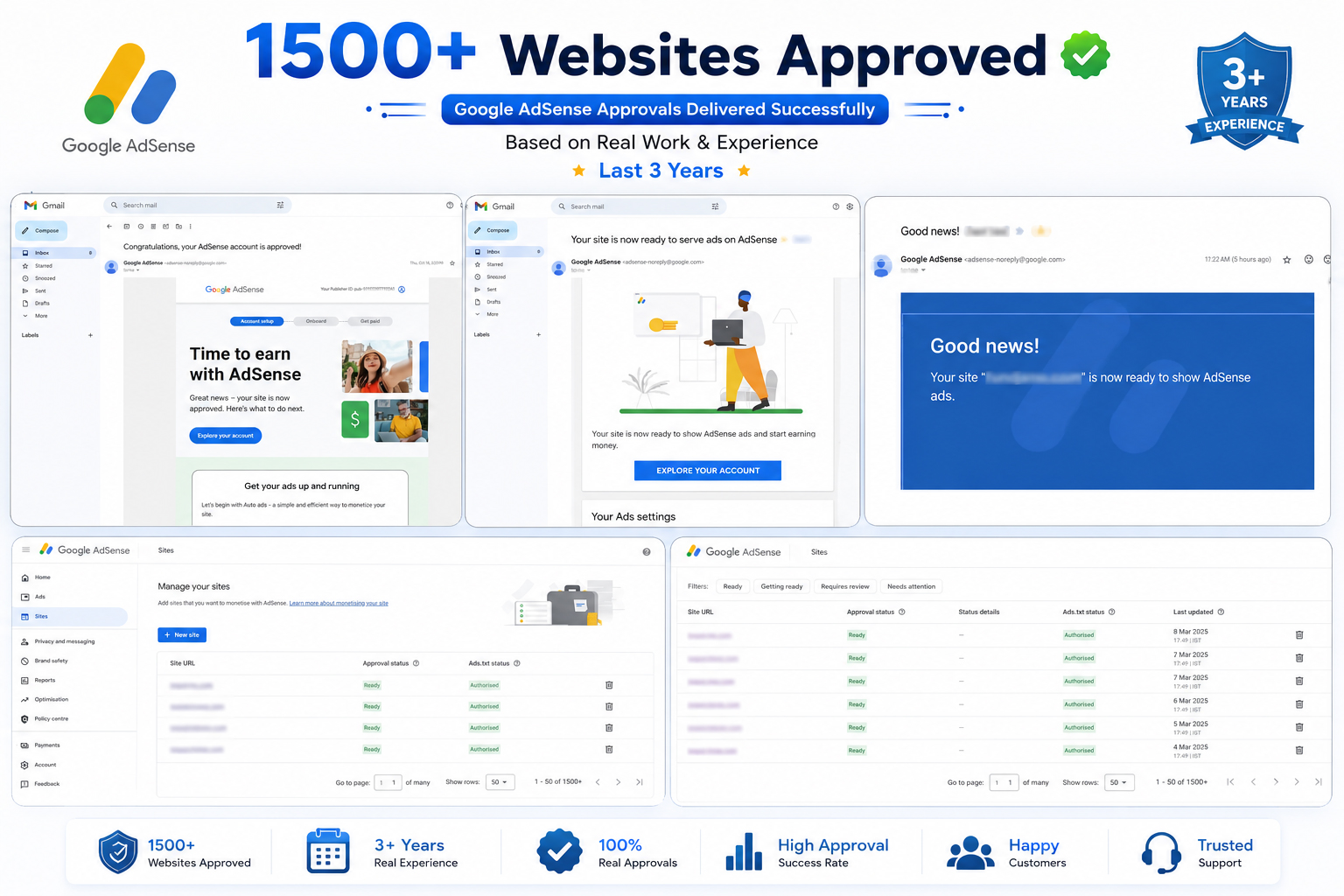
Some common reasons include:
- ❌ Missing legal pages
- ❌ Poor website structure
- ❌ Weak SEO setup
- ❌ No sitemap configuration
- ❌ No Search Console connection
- ❌ Slow-loading pages
- ❌ Bad mobile responsiveness
- ❌ Poor navigation experience
- ❌ Thin content publishing
This backup focuses on creating a better starting point for new website owners.
Instead of manually fixing everything later, beginners can start with a properly organized setup from the beginning.
💎 What Makes AdSense Ready Pro Backup 2026 Special?
Unlike normal WordPress setups, this backup focuses on both SEO optimization + AdSense preparation.
- ✨ Beginner friendly setup
- ✨ Professional website structure
- ✨ SEO-friendly configuration
- ✨ Mobile optimized design
- ✨ Fast loading experience
- ✨ Legal pages included
- ✨ Easy restoration process
- ✨ Clean website design
- ✨ Better user experience
- ✨ Monetization-ready structure
Most importantly, beginners do not need advanced technical knowledge.
Even if you are creating your first WordPress website, you can easily restore the backup and begin working.
🎯 Who Should Use AdSense Ready Pro Backup?
This product is ideal for people who want to save time and avoid beginner mistakes.
- 👨💻 Beginner Bloggers
- 💰 Affiliate Marketers
- 📰 News Website Owners
- 📚 Educational Website Creators
- 🎯 Niche Blog Owners
- 🧑🎓 Students Starting Online Earning
- ✍ Content Publishers
- 🌐 New WordPress Website Owners
If you are completely new to blogging and WordPress, this backup can help you start faster with better structure.
However, always remember:
We only provide a professional setup and proper guidance. Final results like ranking, indexing, traffic, and AdSense approval depend mainly on your content quality, originality, consistency, website niche, and Google policy compliance.
🚀 Short Description of AdSense Ready Pro Backup
AdSense Ready Pro Backup is a beginner-friendly WordPress backup designed to help users quickly launch an SEO optimized and AdSense-friendly website without technical confusion. It includes a professional website structure, essential plugins, Rank Math SEO setup, legal pages, mobile-friendly design, and proper optimization to help beginners create a stronger monetization foundation.
📈 Why Beginners Usually Fail in AdSense?
Many beginners think that simply creating a website and posting a few articles is enough for AdSense approval.
Unfortunately, that is not how things work.
Google looks at many factors including:
- Website quality
- Content originality
- User experience
- Website trust
- Mobile friendliness
- Navigation structure
- Page quality
- Policy compliance
That is why proper website setup matters from the beginning.
⚡ Features Included in AdSense Ready Pro Backup
When beginners start a WordPress website, most people feel confused about what exactly is required for a professional and AdSense-friendly setup.
That is why AdSense Ready Pro Backup includes important features already arranged in a practical way.
- ✅ AdSense-friendly website structure
- ✅ Rank Math SEO basic setup
- ✅ Fast-loading website layout
- ✅ Mobile responsive design
- ✅ Legal compliance pages included
- ✅ SEO-friendly permalink structure
- ✅ Search engine optimization foundation
- ✅ Category and navigation setup
- ✅ Essential plugin support
- ✅ Beginner-friendly dashboard organization
- ✅ Sample content structure for better publishing
🎯 AdSense Friendly Website Structure
One of the biggest mistakes beginners make is creating an unorganized website.
Many websites look incomplete, confusing, or unprofessional, which can negatively impact trust and user experience.
This backup follows a cleaner website structure that helps users create a more professional online presence.
The structure includes:
- ✔ Clean homepage setup
- ✔ Better website navigation
- ✔ Professional page arrangement
- ✔ SEO-friendly category system
- ✔ Mobile responsive design
- ✔ Reader-friendly layout
A clean website structure improves both user experience and website credibility.
📈 SEO Optimized Configuration
SEO plays an important role in website visibility.
Many beginners publish articles without proper SEO settings, which often creates indexing problems and poor ranking opportunities.
Inside AdSense Ready Pro Backup, beginners get a strong basic SEO foundation already configured.
🔍 SEO Features Included
- ✅ Rank Math SEO setup
- ✅ SEO-friendly permalink structure
- ✅ Proper heading hierarchy
- ✅ XML sitemap setup
- ✅ Basic schema optimization
- ✅ SEO-friendly category structure
- ✅ Sample SEO article format
This helps beginners avoid many common SEO mistakes.
However, proper SEO success still depends on quality content and regular publishing.
🔌 Essential Plugins Pre-Installed
Most beginners do not know which plugins should be installed and which unnecessary plugins should be avoided.
Too many plugins can slow down a website and sometimes create security problems.
That is why this backup focuses on keeping things practical and useful.
🧩 Included Plugin Setup
- ✅ Rank Math SEO
- ✅ Backup Migration Plugin
- ✅ Security optimization plugin
- ✅ Cache & performance plugin
- ✅ Sitemap support
- ✅ Speed optimization tools
Instead of wasting hours testing random plugins, beginners get a cleaner starting point.
🛡️ Important Legal Pages Included
Many beginners forget to create legal and compliance pages.
This is one of the most common mistakes before applying for monetization.
To make things easier, the backup already includes important trust-building pages.
📄 Included Pages
- ✅ About Us
- ✅ Contact Us
- ✅ Privacy Policy
- ✅ Disclaimer
- ✅ Terms & Conditions
These pages help create a more professional impression and improve website trust.
🛠️ Beginner Friendly Setup Process
Even if you are completely new to WordPress, restoring the backup is simple.
You do not need coding knowledge or technical experience.
📋 Step-by-Step Guide to Use AdSense Ready Pro Backup
🔹 Step 1 – Install Fresh WordPress
First, purchase hosting and domain, then install a fresh WordPress website inside your hosting panel.
Most hosting providers offer one-click WordPress installation.
After installation, login to your WordPress dashboard.
🔹 Step 2 – Install Backup Migration Plugin
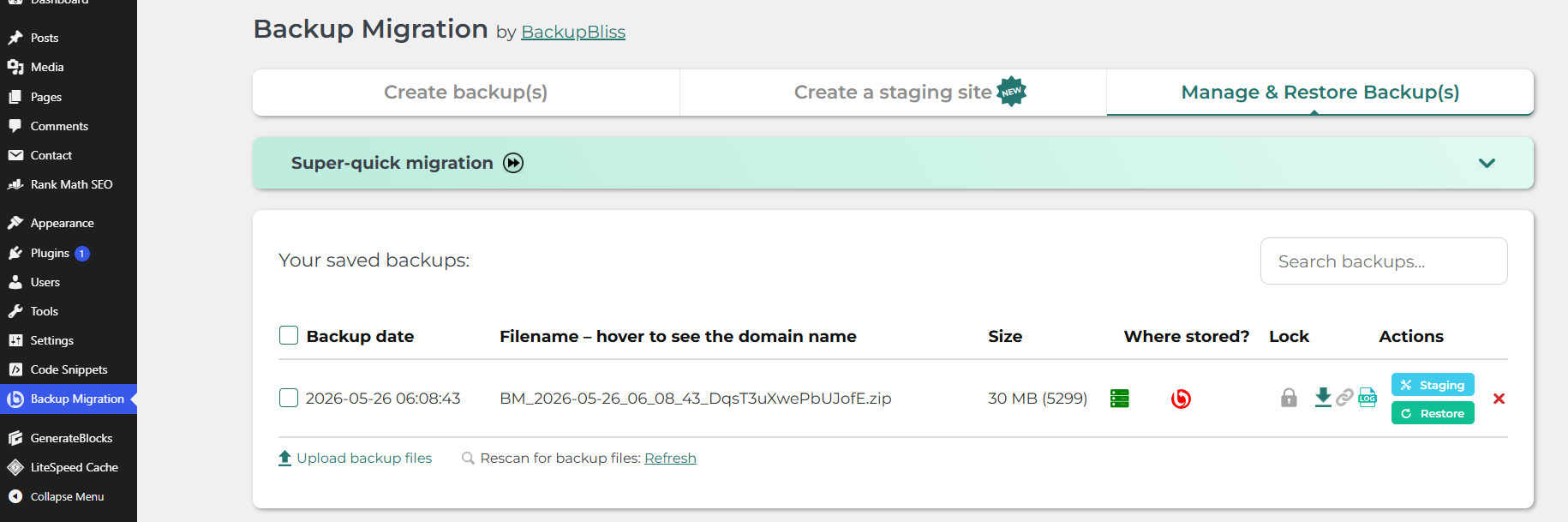
Now go to:
Dashboard → Plugins → Add New
Search for:
Backup Migration
Install and activate the plugin.
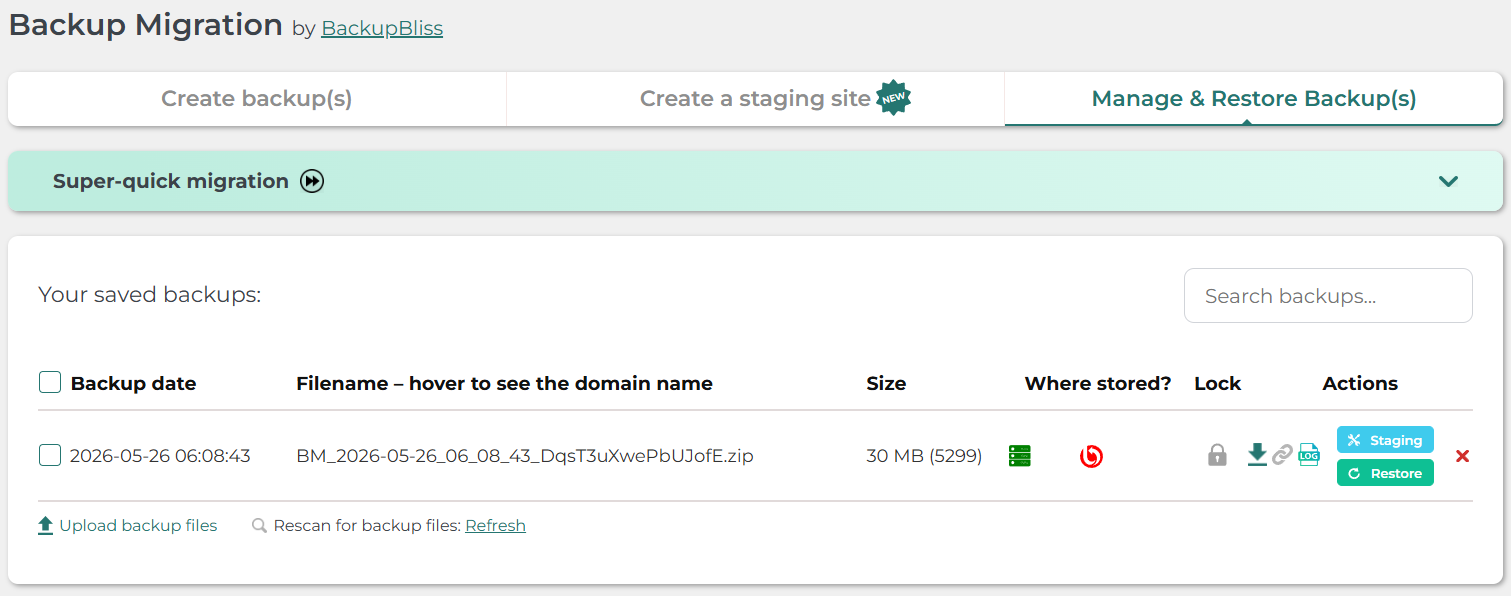
🔹 Step 3 – Upload Backup File
After plugin activation, upload:
📂 AdsenseReadyBackup.zip
Wait for the upload process to complete.
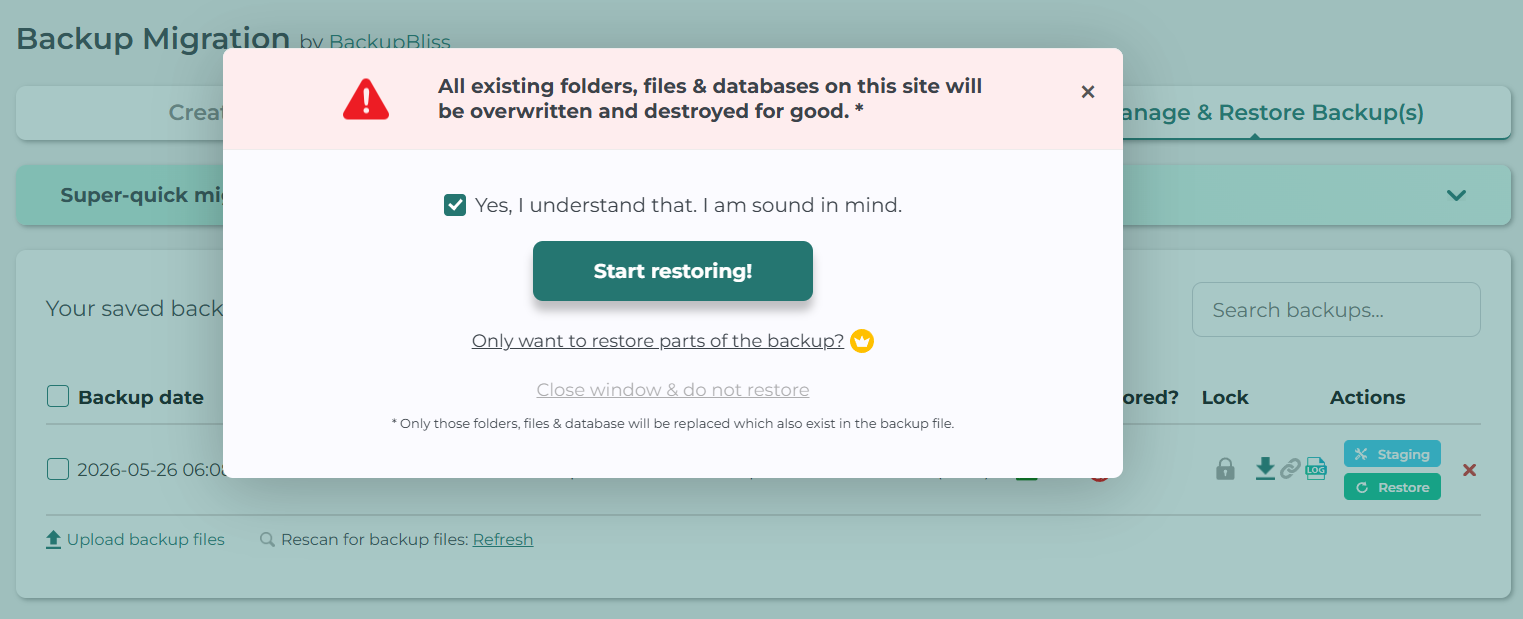
🔹 Step 4 – Restore the Backup
Start the restore process and allow the plugin to finish importing the complete website setup.
Once restoration is complete, your website will look professionally organized.
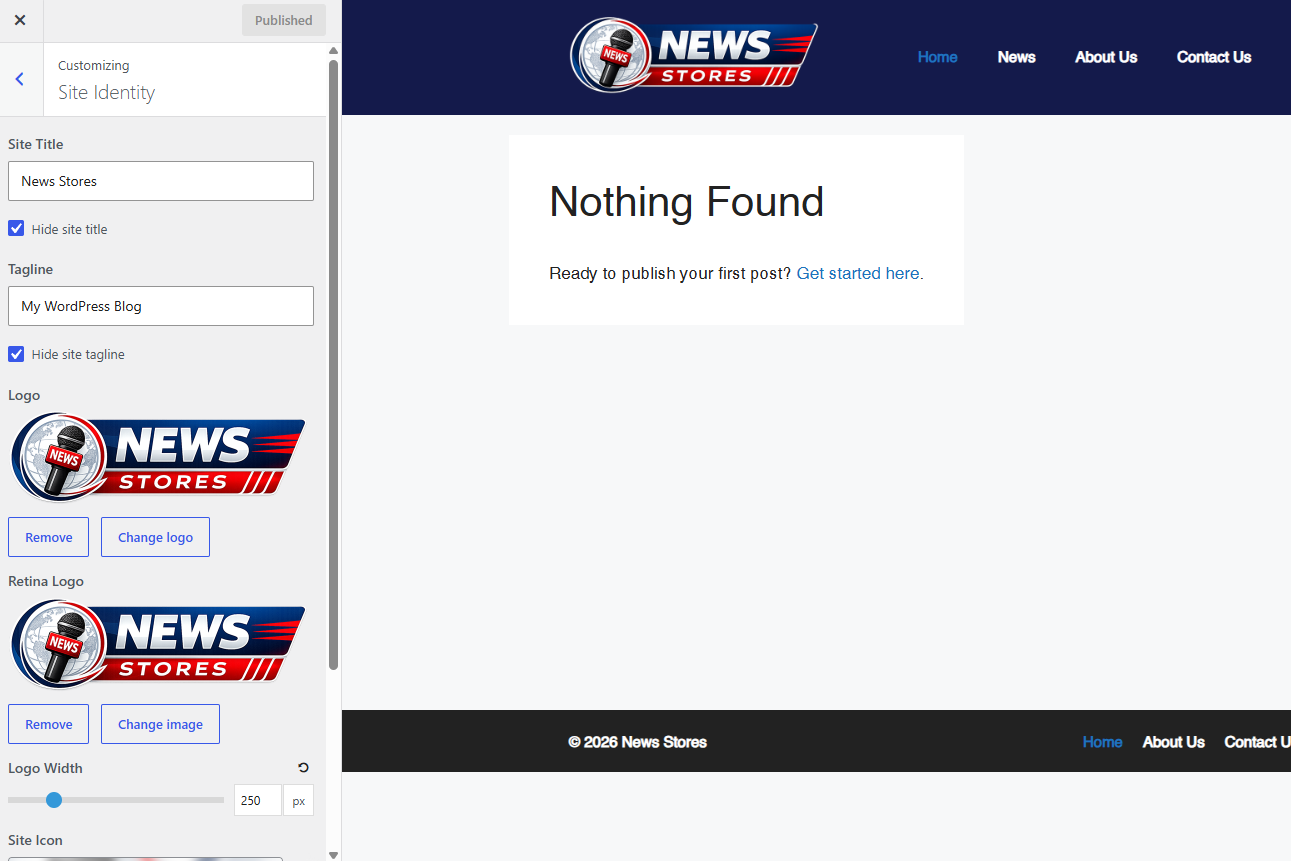
🔹 Step 5 – Customize Your Website
After restoration, you should replace demo elements with your own branding.
Update:
- 🎨 Website logo
- 📝 Content
- 🖼 Images
- 📂 Categories
- 🌐 Website title
- 📧 Contact information
This step is very important because originality matters.
👤 Important Step After Backup Upload – Create Your Own Admin User
After restoring the backup, one very important step many beginners forget is creating their own admin account.
Do not continue using the default demo username or email.
For better security and proper ownership, always create your own new administrator account using your personal username and email ID.
📌 How to Create Your Own Admin User?
After backup restoration:
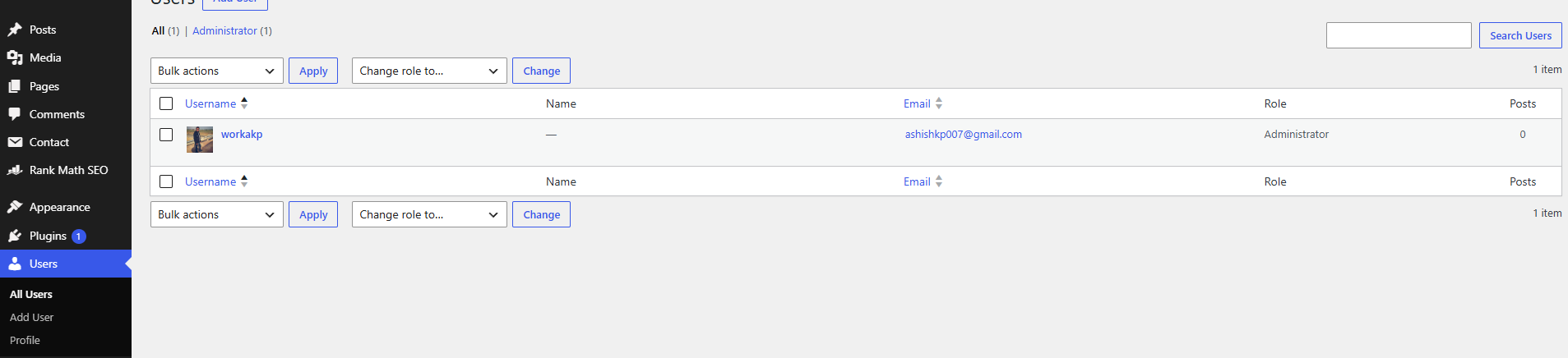
Go to:
Dashboard → Users → Add New
Now fill in your details carefully:
- ✅ Add your own Username
- ✅ Use your personal Email ID
- ✅ Create a strong password
- ✅ Select Administrator role
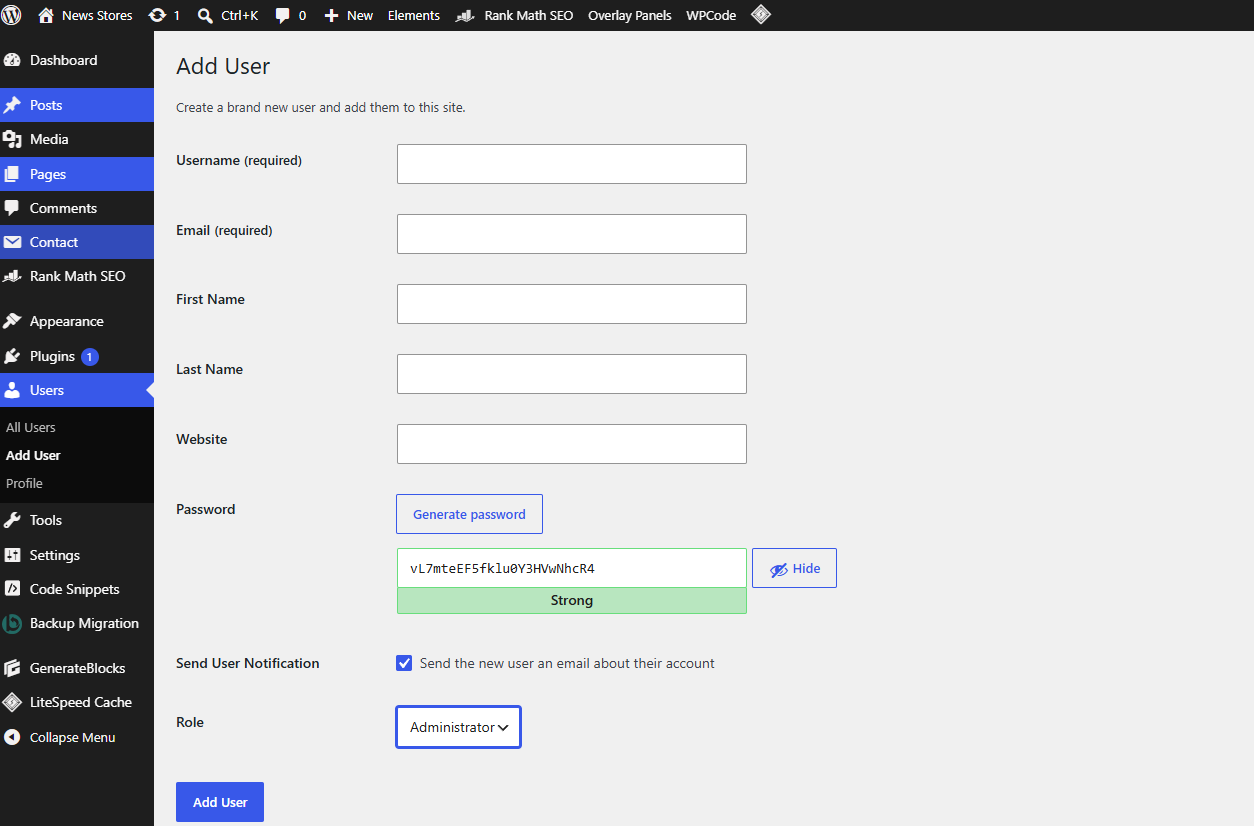
After creating your new admin account:
- ✔ Login using your new username
- ✔ Verify everything is working properly
- ✔ Delete old demo/default admin account if unnecessary
Important Security Tip: Never keep default usernames or old demo email IDs after restoring a backup. Always use your own email and secure login details for better website security and proper ownership.
This small step improves both security and professionalism for your WordPress website.
📊 How to Setup Rank Math SEO Properly?
SEO setup is one of the most confusing parts for beginners.
Inside this backup, Rank Math basic settings are already configured, but you still need to complete some small steps.
Basic Rank Math Setup Checklist
- ✅ Add website name
- ✅ Select website type
- ✅ Connect Google account
- ✅ Enable XML sitemap
- ✅ Configure homepage SEO
- ✅ Setup post schema
- ✅ Add social profiles
- ✅ Optimize titles & metadata
Proper SEO settings can improve crawling and indexing opportunities.
📰 Recommended Post Structure for Better Results
Many websites fail because articles are poorly written or have weak structure.
Try to follow this structure:
- ✔ Strong SEO title
- ✔ Clear introduction
- ✔ Table or highlights section
- ✔ Proper headings (H2, H3)
- ✔ Human-written content
- ✔ FAQ section
- ✔ Internal links
- ✔ External references when needed
- ✔ Proper featured image
Do not publish copied or AI-spam content. Always focus on useful, original, and human-friendly information.
🌐 How to Add Website in Google Search Console?
After your website setup is complete, the next important step is adding your website to Google Search Console.
Search Console helps Google understand and index your website.
Steps to Add Website
- 1️⃣ Open Google Search Console
- 2️⃣ Add your domain property
- 3️⃣ Verify ownership through DNS or hosting
- 4️⃣ Submit your sitemap
- 5️⃣ Wait for Google crawling
Without Search Console, indexing becomes slower and tracking performance becomes difficult.
🗺️ Submit XML Sitemap
After connecting Search Console, sitemap submission becomes very important.
Your sitemap usually looks like:
yourdomain.com/sitemap_index.xml
Submit the sitemap inside Search Console so Google can crawl pages more efficiently.
📌 Add Google Analytics Code
To track website visitors, traffic, and user behavior, you should connect Google Analytics.
After creating a Google Analytics property, simply add the tracking code inside your website.
This helps you understand:
- 📈 Website traffic
- 📍 Visitor location
- 📱 Device type
- 📰 Popular pages
- ⏱ User engagement
Analytics becomes very useful when growing a website professionally.
🎁 What Will You Receive?
After purchasing AdSense Ready Pro Backup, you will receive everything needed to start your website quickly without unnecessary confusion.
- 📂 AdsenseReadyBackup.zip File
- 📘 Beginner-Friendly Setup Guide
- ⚙ Basic Recommended Settings
- 📈 WordPress Setup Guidance
- 🛠 Beginner Friendly Restoration Process
- 🎯 AdSense-Friendly Website Foundation
Everything is arranged to save time and reduce technical difficulties for beginners.
✅ Benefits of Using AdSense Ready Pro Backup
Starting a WordPress website from scratch can take days or even weeks, especially if you are a beginner.
This backup helps reduce setup time and gives users a cleaner starting point.
🌟 Major Benefits
- ✅ Saves setup time
- ✅ Beginner-friendly setup process
- ✅ Professional website structure
- ✅ Better SEO foundation
- ✅ AdSense-friendly organization
- ✅ Mobile responsive layout
- ✅ Easy restoration process
- ✅ Fast-loading structure
- ✅ Legal pages included
- ✅ Clean user experience
Instead of spending days learning technical website settings, beginners can focus directly on publishing quality content.
👨💻 Who Should Avoid This Backup?
Although this product is beginner friendly, it may not be suitable for everyone.
You should avoid this backup if:
- ❌ You want instant AdSense approval without creating quality content
- ❌ You plan to publish copied articles
- ❌ You are looking for a “one-click earning guarantee”
- ❌ You do not want to customize website branding
Website success always requires effort, consistency, and proper content quality.
⚠ Important Note About AdSense Approval
Please understand one important thing clearly.
We only help you follow a proper and professional website setup process based on practical experience.
Final AdSense approval depends on multiple factors including:
- 📌 Original content quality
- 📌 Website niche
- 📌 Content consistency
- 📌 Google policy compliance
- 📌 User experience
- 📌 Website trust signals
- 📌 Proper indexing of pages and posts
Similarly, post indexing and ranking also depend mainly on your content quality and SEO implementation.
We simply provide the right structure, setup process, and practical guidance based on real experience.
No person, course, service, plugin, or backup can guarantee 100% AdSense approval. Final approval always depends on Google’s policies and review process.
💡 Best Strategy Before Applying for AdSense
Instead of applying immediately after website setup, beginners should follow a smarter approach.
Recommended process:
- ✅ Setup website properly
- ✅ Customize branding completely
- ✅ Publish original human-written content
- ✅ Create useful category structure
- ✅ Add website to Search Console
- ✅ Submit XML sitemap
- ✅ Connect Analytics
- ✅ Wait for proper indexing
- ✅ Publish 15–30 quality articles
- ✅ Make website look active and genuine
Once some posts and pages start indexing properly, then you can apply for AdSense.
This approach generally gives beginners a better chance compared to applying too early.
❓ Frequently Asked Questions (FAQ)
🤔 Is AdSense Ready Pro Backup beginner friendly?
Yes. The setup process is designed for beginners. Even if you have never created a WordPress website before, you can restore the backup and start learning.
🔄 Which plugin is used for restoration?
The backup is restored using the Backup Migration plugin.
📊 Is Rank Math SEO already configured?
Yes. Basic Rank Math SEO settings are already configured to provide a better SEO foundation.
🌐 Can I use this backup for any niche?
Yes. You can customize it according to your niche such as:
- 📰 News Websites
- 📚 Educational Blogs
- 💰 Affiliate Websites
- 📱 Tech Blogs
- 🎯 Niche Blogs
- 🛒 Product Review Websites
- ✍ Personal Blogs
💸 Will I get instant AdSense approval?
No. No person or service can guarantee instant approval.
Approval depends on content quality, originality, website trust, compliance, niche quality, and Google review standards.
📌 Do I still need to write content?
Yes. This backup gives you a professional structure and setup, but your content quality still matters the most.
🎯 Final Verdict – Is AdSense Ready Pro Backup Worth It?
If you are a beginner and do not want to waste time struggling with WordPress settings, plugin confusion, SEO setup, legal pages, and AdSense preparation, then AdSense Ready Pro Backup can save you a lot of effort.
Instead of manually setting up everything from scratch, you start with a professionally organized website foundation.
The biggest advantage is that beginners get a better structure from day one.
However, always remember:
This is not a magic shortcut for instant approval.
Success depends on:
- ✔ Good content
- ✔ Consistent posting
- ✔ Proper SEO
- ✔ Better user experience
- ✔ Google policy compliance
If you use the setup properly, publish original articles, and stay consistent, this backup can help you build a stronger website foundation for future monetization.
🚀 Ready to Build Your AdSense-Friendly Website?
Start smarter instead of struggling with technical setup.
Restore the backup, customize your website, publish original content, and build a professional blogging foundation with confidence.
📞 Need Help?
If you face any issue during backup restoration, WordPress setup, plugin configuration, or website customization, feel free to contact us.
💬 Need quick help? Simply ping us on WhatsApp.
📱 WhatsApp / Call Support: 9522288666
📧 Support Email: bazaarwp@gmail.com
🌐 Website: WPBazaar.in
We will try our best to help you with the setup process.
Useful Link Example
Only logged in customers who have purchased this product may leave a review.
-
Sale!

AdSense Ready WordPress Website Setup Service – Premium Blog Launch Kit 2026
Original price was: $806.42.$258.03Current price is: $258.03. -
Sale!

500+ High-Converting Landing Page Templates For WordPress With Exclusive Bonuses — FREE
Original price was: $483.84.$19.99Current price is: $19.99. -
Sale!

Google AdSense New Loading Method 2027 – Earn $200/Day Easily
Original price was: $64.48.$19.99Current price is: $19.99. -
Sale!

Google AdSense Approval Guide 2025 – Monetize Your Blog Quickly
Original price was: $64.48.$19.99Current price is: $19.99.
Reviews
There are no reviews yet.